PMBDocuments & mediaView on App Store

Your files.
Your music.
Your space.

From the first download to your favorite song.
Bring your digital life together with PMB.

Discover PMB on the App Store Take a closer look

Built for iOS. Made for everything you keep.

A PMB folder bringing documents, photos, music and video togetherA little less switching.
A lot more doing.
OrganizeDownloadListenScanDeclutterKeep privateTransfer

One app.
So many ways to use it.

The everyday tools you need, connected around the files that matter to you.

A place for
every kind of file.

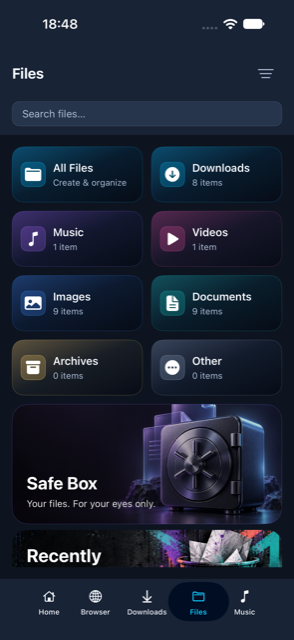
Bring in documents, photos, videos and audio from Apple Files, other apps or the web. Keep them organized and ready for whatever comes next.

  • Folders, categories, search and sorting
  • Rename, move, copy and share
  • Preview supported PDFs, images, videos and documents
  • Create ZIPs, extract archives and recover items from Recently Deleted
PDFJPGMP3MP4ZIP+ more

Preview and playback support depend on the file format and iOS.

PMB Files screen with categorized documents and media
Inside PMB · Files
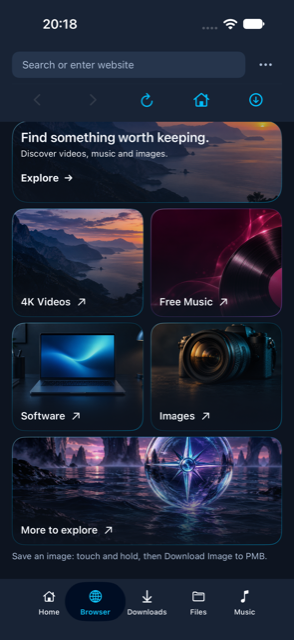
PMB built-in browser with address bar, shortcuts and discovery artwork
Inside PMB · Browser

Find it.
Download it.
Keep it close.

A built-in browser and download manager take you from a link to a local file without the extra steps.

  • Tabs, bookmarks, history and private browsing
  • Download supported files from the web or a direct URL
  • Track progress, pause, resume and retry supported transfers
  • Open downloads straight from your library

Download only content you have permission to save. Availability and resume support depend on the source website.

Your library.
Your soundtrack.

Give the music you already own a home. Browse songs, albums and artists, build playlists and come back to your favorites.

  • Local audio and supported downloaded Apple Music library items
  • Favorites, playlists and Recently Played
  • Background playback and Lock Screen controls
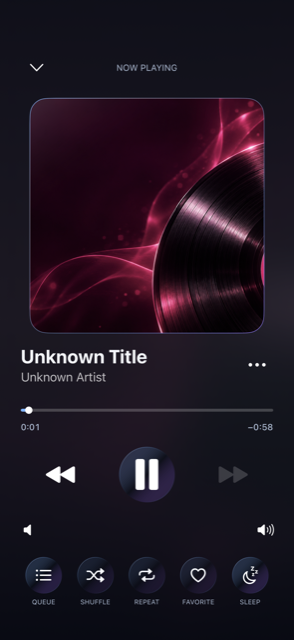
  • Queue, shuffle, repeat and a sleep timer

Device Music access requires permission. Protected tracks cannot be exported.

PMB player with artwork, playback controls, queue, favorites and sleep timer
Inside PMB · Player

A little more capability.
A lot more possibility.

Paper, meet digital.

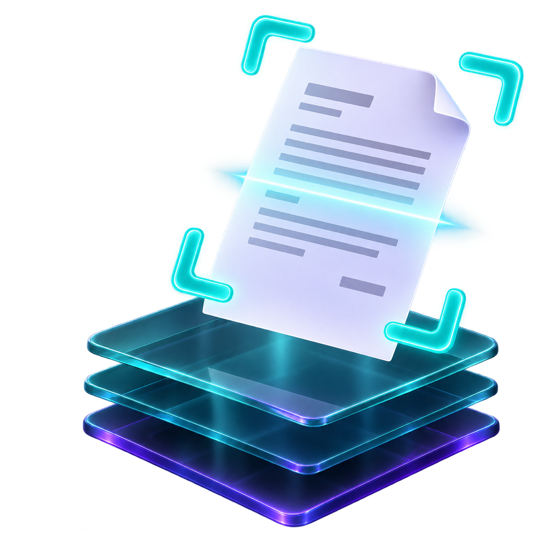
Scan with your camera or add pages from Photos and Files. Crop, correct perspective, adjust filters, reorder pages and export a PDF or images.

Document Scanner · On-device processing
Document scanner illustration
Safe Box illustration

A space that's just yours.

Keep private copies outside your public PMB library. Unlock Safe Box with Face ID, Touch ID or your device passcode. It locks when PMB goes into the background.

Safe Box · Device authentication

Uses standard iOS file protection, not additional PMB encryption. Originals remain where they were. Safe Box is excluded from backups.

Make room.
Keep what matters.

Review duplicates, screenshots and large items in your PMB library, permitted Photos or a folder you choose. See the candidates before you decide what to remove.

Choose a sourceReview the resultsConfirm your selection
Storage Cleaner · You're in control

Space estimates vary. PMB cannot scan other apps' private storage or clean your entire device.

Across devices.
Without the cable.

Open PMB's local transfer page in your computer's browser. Use the access code to upload and download files in the shared folder over the same Wi-Fi network.

Wi-Fi Transfer · Computer browser access

Use a trusted network and keep PMB in the foreground. Transfers use local HTTP.

Phone and computer connected for Wi-Fi transfer

Thoughtful details.
Every day.

Share into PMB

Review incoming files from other apps before importing them.

Scan a QR code

Read a code with the camera and choose when to open its link.

Your originals stay yours

Imports preserve original file content. Edited scans become new files.

Keep listening

A mini-player keeps your music within reach while you move through PMB.

More room
with Premium.

Start with the everyday essentials. Upgrade in the app for more capacity, more flexibility and no ads.

Explore PMB

Monthly, yearly and lifetime options, where offered. Current prices and availability appear in the app before purchase.

Premium includes

  • DownloadsUnlimited queue · up to 5 at once
  • Safe BoxUnlimited private files
  • Storage CleanerUnlimited cleanup
  • ZIP creationUnlimited archives
  • MusicUnlimited playlists
  • ScannerUnlimited page exports
  • BrowserUnlimited bookmarks
  • Your experienceNo ads

“Unlimited” removes PMB's feature quotas; device storage, iOS and technical limits still apply. Features shown reflect the current PMB release design; App Store availability may vary by version.

A few things
you might be wondering.

Can I use PMB offline?

Yes. Organizing and opening compatible local files, listening to local audio and editing scans work without an internet connection. Browsing, new downloads, ads and purchase verification may require a connection. Wi-Fi Transfer requires a shared local network.

Does PMB upload my files to a cloud service?

PMB's core library, scanning and cleanup work on your device. PMB does not provide its own cloud backup service. Transfers, sharing and websites you choose can send data outside the app; iOS and your selected storage providers have their own backup and sync behavior. Read the Privacy Policy for the full picture, including advertising.

Is Safe Box a backup or encrypted vault?

No. Safe Box is an app-private folder protected by device authentication and standard iOS file protection. PMB does not add its own encryption. Safe Box content is excluded from backups, and importing does not remove the source copy. Export important files to a separate safe location.

What is included for free?

The current free allowance is 2 unfinished download slots, 3 Safe Box files, 3 bookmarks, 5 playlists, 5 newly exported scan pages per day, 10 Cleaner removals per day and 3 ZIP creations per day. Earned slots remain available. Ordinary file management, playback, archive extraction and Wi-Fi Transfer are available. The app shows the allowance that applies to your version; optional rewards may offer extra uses when available.

How do subscriptions and restores work?

Apple handles purchases. Monthly and yearly plans renew automatically unless canceled through your Apple account. Lifetime is a one-time purchase for the lifetime of the app, not a promise of perpetual service. Use Restore Purchases in PMB with the original Apple account. Verified legacy PMB lifetime purchases also grant Premium. See the Terms of Use.

How can I get help?

Email apps.jabbari@gmail.com, or use Contact Us in PMB Settings. Include your app version and a description of the problem; avoid sending private files unless needed and you choose to share them.


PMB app icon

Everything you keep.
Closer together.

View PMB on the App Store